9/14/2015

Launch X431 V Wifi/Bluetooth Tablet Full System Diagnostic Tool
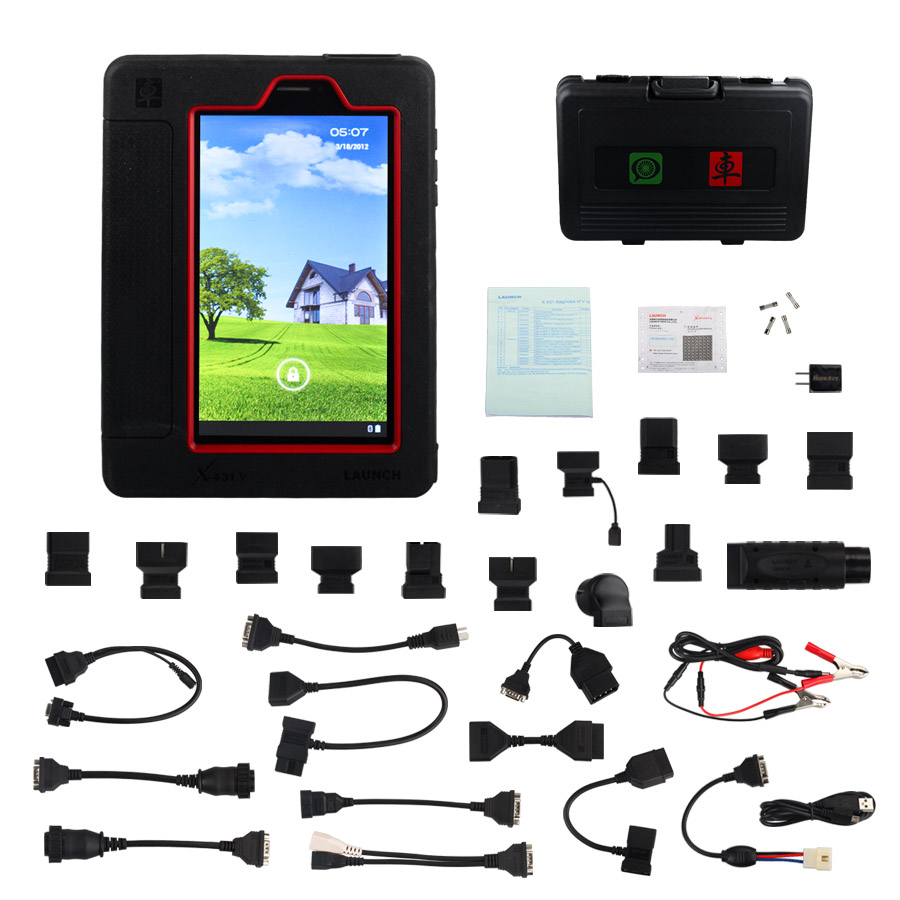
Launch X431 V Wifi/Bluetooth Tablet Full System Diagnostic Tool

Top 7 Reasons to Get Launch X431 V:

1. Supported Languages: 
English, German, French, Italian, Spanish, Portuguese, Polish, Russian, Japanese, Traditional Chinese
2. Wi-Fi: Supported
3. Bluetooth: Supported
4. Dealer Code: 86A or 86K
5. Easy to Update: Support Online One-Click Update, No Need to Download Software to CF Card.
6. There is User Manual in the Multiplexer, you can check it when you use the device. it is in "cnlaunch" file.
7. Built-in battery 3000mha, Endurance 4 hours


Description:
 
Launch X431 V (X431 Pro) with Bluetooth/Wifi based on Android system, is a new car malfunction diagnostic device developed by Launch Tech for internet application. X-431 V completely substitutes X431 IV and X431 Diagun III. It passes on Launch advantages in car fault diagnostic technology, such as vast car model coverage, powerful test function, special function and accurate tast data, etc.,  X-431 V achieves the full car model and full system fault diagnosis through the bluetoooth communication between DBSCar connector and intelligent mobile terminal. X-431 V taking the advantage of mobile internet, can share maintenance data and case library, provide instant maintenance information, and build public and private maintenance social circle,etc.,thus lead to wide car diagnostic community. 
It is a typical diagnostic device contributed by Launch to diagnostic industry concerning internet application.
 
X431 V Product Features:
 
Panel PC: High configuration of hardware , fast running speed
Capacitor Screen: Multi-touch capacitor screen, more smooth operation
WIFI Diagnosis: Wireless communication between intelligent mobile terminal and DBSCar connector via Bluetooth
Portable: Reasonable PDA design, small size for easy carry
Optimized Interface: Brand new operation interface design, interface more friendly and operation much easier
Wifi communication: Support WIFI network
Android System: Users can install and Android software
Numerous Additional Functions: Photo, video, multimedia, other software application,etc.
 
X431 V Original Supported Car Models:
 
Acura, Changan, Daweoo, Gaz, Hafei, Huachen, Jiao, Lexus, Xiali, Xinkai, Benz, Fiat, Holden, Maruti, Opel, Peugeot, Saab, Ssangyong, Tata, Changhe, Flyer, GMSA, Infiniti, Mahindra, Perodua, Proton, Qirui, Tlisuzu, Zhongshun, EOBD2, Euroford, GM, Jagar, Renault, Smart, Sprinter, USA Ford, VAZ, VW, Changcheng, Dacia, Ford, HaoQing, Jinlong, Liuwei, Rover, ZhongTai, ZhongXing, Bxfiat, HM, Isuzu, Jacty, JPIsuzu, Mazda, Seat, Skoda, Suzuki, BMW, Daihatsu, Mitsubishi, Porsch, Toyota, Volvo, Audi, Chrysler, Citroen, Hyundai, Kia, Lancia, Landrover, Nissan, Romeo and Subaru.
 
Pannel PC Parameters:
 
Operating System: Android
CPU: Dual core 1GHz
Battery: 3000mh, rechargeable polymer lithium battery
Standby time: it is subject to the using environment. Generally it can keep working for 4 hours.
Extension memory card: 32G Micro SD(TF) card supported
Memory: 512MB
Storage capacity: 2GB
LCD: 7.0 inch
LCD resolution: 1024X600
Touch screen: 5 points capacitive touch screen
Cameras: 2 mega rear and 0.3 mega front
Working temperature: -10°C ~ 55°C (14°F to 131°F)
Storage temperature: -20°C ~ 70°C (-4°F to 158°F)
 
DBSCar Connector Parameters:
 
Working Voltage: 9 ~15V
Average working current: about 35mA
Standby current: about 25mA
Working temperature: -20 to 55°C (-4°F to 131°F)
Storage temperature: -30 to 70°C (-22°F to 158°F)
Storage humidity: <80%
Working humidity: <60%
Net weight: about 26g
Bluetooth Distance: 10M (without obstacle)
 
What is Difference Between X431 V and X431 IV?
 
Operation System:
X431 IV: LINUX
X431 V: Android

Screen
X431 IV: LCD Touch with backlight, 240*320
X431 V: 7 inch Capacitive Touch

Processor:
X431 IV: 72MHz 32-bit ARM7
X431 V: 1GHz Dual Core

Memory:
X431 IV: 16M
X431 V: 512M

Storage:
X431 IV: 1GB CF Card
X431 V: 2GB, extendible to 32G

Battery
X431 IV: No
X431 V: 3000mAh, Endurance: 4h

Printer:
X431 IV: Thermal Printer
X431 V: NO

Diagnostic Method:
X431 IV: Test Cable
X431 V: Bluetooth/WIFI

Diagnosis
X431 IV: Wired diagnosis, independently diagnose full system and analysis & display through smart terminal.
X431 V: Bluetooth diagnosis, independently diagnose full system and analysis & display through smart terminal

Diesel Vehicle
X431 IV: Yes, 12V
X431 V: NO

Upgrade method
X431 IV: Download to CF Card
X431 V: Online one-click upgrade

Multi Group Display
X431 IV: 2
X431 V: 4,6,12

Camera:
X431 IV: NO
X431 V: Front: 0.2 megapixel, Rear: 2.0 megapixel

Startup Time:
X431 IV: 35s
X431 V: 25s

Picture/Audio/Video/Instant Chat
X431 IV: NO
X431 V: YES

Design Feature:
X431 IV: Encapsulate design at side and bottom, anti-knock, powerful function, economical cost 
X431 V: Tablet, Multi-touch, Customer Management

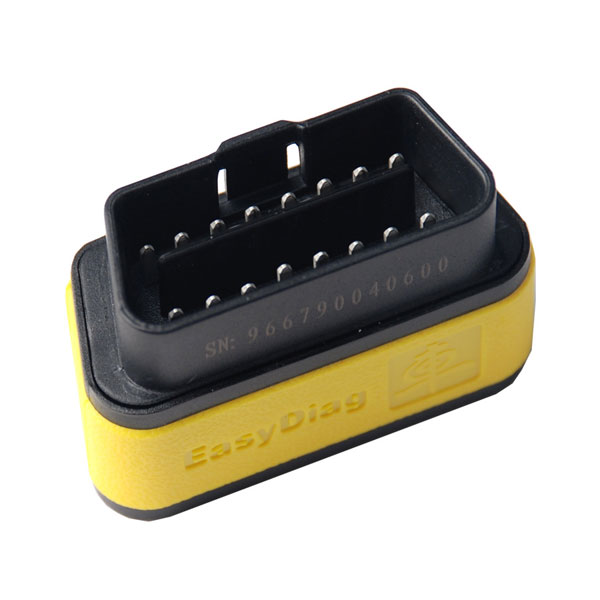
LAUNCH X431 Bluetooth OBDII Generic Code Reader EasyDiag for IOS

Original LAUNCH X431 Built-in Bluetooth OBDII Generic Code Reader EasyDiag for IOS 
 

Easydiag is easy for you  to work with IOS device, making your iPhone or iPad a powerful diagnostic scanner!
This tool can be updated on LAUNCH website.
1.After you register successfully, you can choose the car brands software based on your requirement and finish the payment,
then you can download it to your iPhone or iPad.
2.Connect your iPhone / iPad with LAUNCH X431 EasyDiag, you can diagnose the cars.
This Easydiag for IOS does not require an interface. A single Bluetooth connector along with the company's software allows you to select from over 30 manufacturers from Asian, European and Domestic applications.
 
Specifications/Special Features:
1. Full OBDII generic code reader/scanner capability included wihout charge
2. Reads and clears codes on all vehicle systems
3. Completes system and subsystem coverage (engine, ABS, SRS, transmission and more) with live date and color graphing
4. Enhanced live date and for all vehicle system
5. Includes Bluetooth OBDII connector-optional extension cable available for easier plugging and unplugging of OBDII connector
6. Intuitive interface and easy to use
7. Customizable software-choice from over 70 Asian, European and North American manufacturer for enhanced capability
8. Single carline software priced individually per vehicle manufacturer Additional coverage, capabilities and functions with each new software update
 
Software Purchase:
LAUNCH X431 Esydiag for IOS only includes hardware, no software. You need to  purchase software directly from LAUNCH DBSCAR website. Each car brand software costs 39.95USD.Software supports online update, free update within one year. After one year, each software update costs 29.95USD.
 
USA:
BXGM, CHRYSLER, GM, USAFORD
 
European:
AUDI, BENZ, BMW, CITROEN, DACIA, EUROFORD, FIAT, GAZ, GMSA, JAGUAR, LANCIA, LANDROVER, MINI, OPEL, PEUGEOT, PORSCHE, RENAULT, ROMEO, ROVER, SAAB,SEAT, SKODA, SMART, SPRINTER, VAZ, VOLVO, VW, FORD
 
Aisan:
ACURA, DAEWOO, DAIHATSU, HOLDEN, HONDA, HYUNDAI, INFINITI, JPISUZU, KIA, LEXUS, MAHINDRA, MARUTI, MAZDA, MITSUBISHI, NISSAN, PERODUA, PROTON,SSANGYONG, SUBARU, SUZUKI, TATA, TLISUZU, TOYOTA
 
Please kindly note that:
Precautions on operating vehicle’s ECU
Do not disconnect the vehicle inner consume when the ignition switch is on, so as to avoid the sensors or the ECU damage.
Do not place the magnetic object near the ECU in order to avoid the failure of the circuitry and components.
Do cut off the power supply of ECU system before welding on the vehicle.
Pay more attention to the ECU and the sensors when the operation is next to them.
Ground yourself when you disassemble PROM,otherwise ECU and sensors will be damaged by static electricity.
Do connect ECU harness connector firmly,otherwise electronic elements, such as IC inside ECU, will be damaged.
The instrument is a precision electronic instrument. Pay more attention when in use, do not have it dashed.
The equipment power is supplied by 12v battery voltage;do not use other voltage power.
Turn off the ignition switch when connecting or disconnecting the diagnostic connector.
Put the EasyDiag in its place on the back of the protective casing in order to avoid loss.

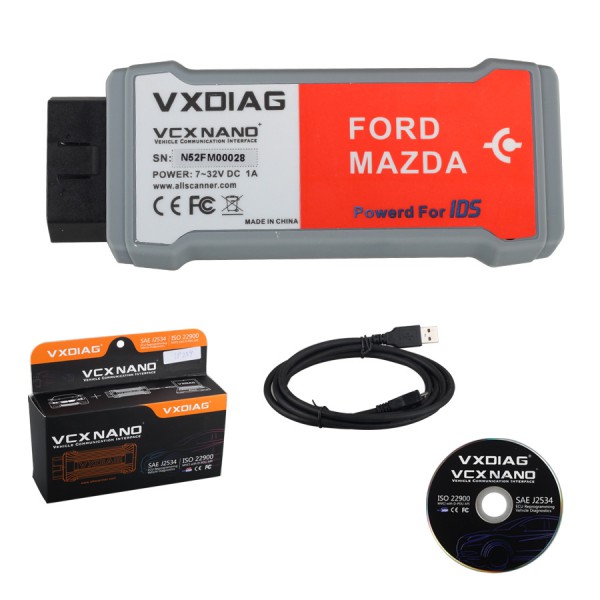
VXDIAG VCX NANO for Ford/Mazda 2 in 1 with IDS V95


New Arrival VXDIAG VCX NANO for Ford/Mazda 2 in 1 with IDS V95
 
New Arrival VXDIAG VCX NANO for Ford/Mazda 2 in 1 
One device support both Ford and Mazda
Support vehicle till 2015 year
Latest software version: V95

Top 5 Reasons to get VXDIAG VCX NANO:


1. FORD IDS Version: V95, Mazda IDS Version: V95
2. Perfect replacement for Ford VCM 2
3. Support multi-languages: English/Japanese/Portuguese/Romanian/Korean/Dutch/Polish/Turkish/Spanish/French/Italian/Croatian/Danish/German/Swedish/Finnish/Slovenian/Czech/Russian/Greek/Chinese
4. Update by CD with unlocked firmware
5. Support both new and old vehicles.

Requirement on Computer:

1. Computer has at least 4GB Memory
2. Computer need produced after 2000 year, too old computer can not run the software.
3. OS needs to be WINDOWS XP SP3.

VXDIAG VCX Nano Description:
 
VXDIAG VCX NANO is an OEM diagnostic interface for the vehicles of Ford and Mazda. It can be compatible with OEM software of Ford IDS and Mazda IDS
 
VXDIAG VCX Nano Function:
 
1. Programming & Installation of new ECUs (PCM, ABS, Instrument Cluster, Air Bag, Fuel Pumps, etc.)
2. Live Data-stream with Recording & Playback Functions for Main ECUs
3. Read & Clear Diagnostic Trouble Codes (DTCs)
4. Set, Adjust or Remove Speed Governors
5. Automatic vehicle recognition
6. New Software Re-flash for Existing ECUs
7. All Other Dealer Functions
8. Steering Angle Resets
9. Guided Fault Finding
10. Program New Keys
11. DPF Regeneration
12. Brake Bleeding
13. Injector Coding

Quickly 4C/4D/46/48 Chip Transponder Programmer

 
Function 1: 
 
1) Chip reading. Accurately identify the chips(11, 12, 13, 33, T5, 40, 41, 42, 44, 45,46, 48, 4C, 4D, 60, 61, 62, 63, 65, 66, 67, 68, 69, 6A, 6B, 70, 71, 74, B9, 8C, 8E, 8A...)
2) Distinguish the formats of 48, 4D and 46 in a detailed way. 2010 Toyota can identify G key and distinguish 4D72. Identification of F2010 new ford key. Directly show the master and deputy keys of Toyota.
 
Function 2:
 
Detect the frequency of remote controller, identify whether Toyota smart cards are new and unused and read data.
 
Function 3:
 
It supports on copying the chips (11 12 13 33 T5 41 and 42) and parts of 44 and 40.
Fully support the copy of chips 4C, 4D and 46, and copy by using a dedicated chip.
 
Function 4:
 
Connecting with Chinese PC software, it can save the read key code data unlimited.
 
Function 5:
 
Support the writing of startup chip. The vehicle models are as follows: Fiat chip 48, Jinbei chip 13, Zhongghua chip 13, Elysee chip 33, Toyota chip 4C, Renault encryption chip 46, FAW Bensturn chips B50 and B70.
Mazda and Mercedes-Benz W140 avoid demolition. Write start of more than 60 models including Ford and calculate password, it is equivalent that it has some tango functions.
 
Function 6:
 
Unlock function of chip 48(encryption chip cannot be unlocked)
 
Function 7:
 
The general chip 48 can be modified to dedicated chip 48. For example, the general chip 48 can be modified into 48A1, 48A2, 48A3, 48A4, dedicated chip 48 of Jetta in 2010 and 2011, dedicated chip 48 of Zhonghua.
 
Function 8:
 
Support the six calculation passwords of Hyundai and Kia chassis before 2007.
 
Function 9:
 
Support on programming all kind of Fiat key, such as (11, 13 and 33), Three anti-theif ways of chip 48.
 
Additional Functions: 
 
Support T5, Temic, and generate 11/12/13/33
Support 4D, generate 4C, 61/62/63/65/66/67/68/69/6A/6B/B9/71
 
Special Notice:
 
For 4D and 46 copy function, need buy special 4D and 46 Decoder with dedicated chips.
 
Instruction for Using:
 
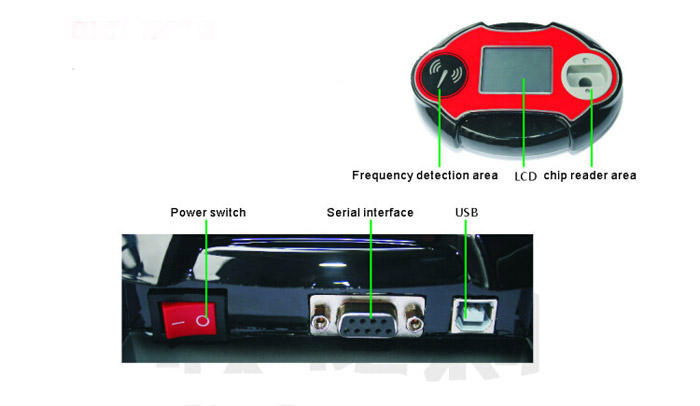
1. The external interface as show in following picture:
Quickly Auto Key Programmer-1
 
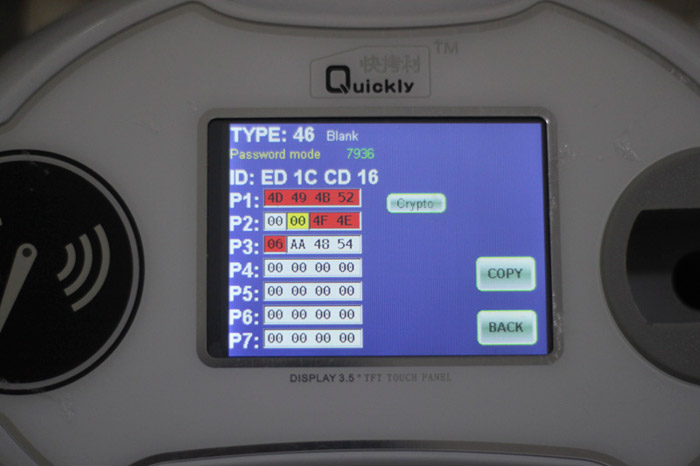
2. Identify the chip
 
Put the chip into the chip read area and click "chip reading and writing". If there is a chip, the corresponding chip and parameter will be displayed, as show in following picture:

Quickly Auto Key Programmer-2
 
3. Copy the chip
 
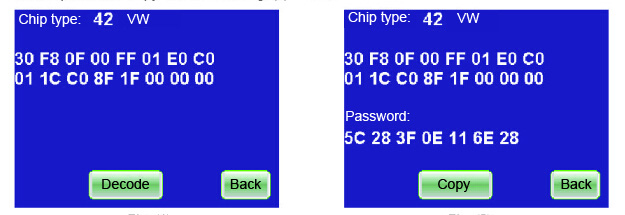
For examply: copy the chip 42. Firstly, put the key that can start the original car into the chip reader area to read data, as show in following picture. Then decoder, remove the key of original car, put into the new chip 42, click "copy", as show in next picture--OK!

Quickly Auto Key Programmer-3
 
4. Additional settings
 
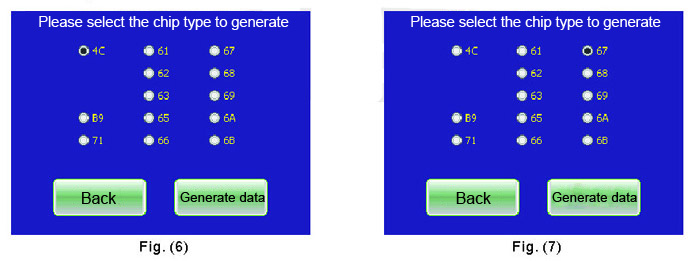
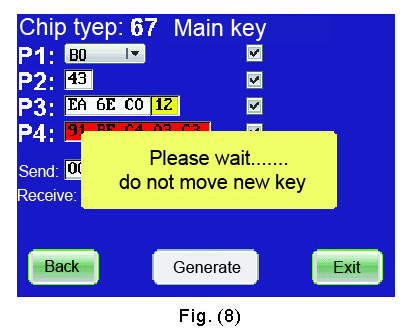
For example: in order to generate the chip 4D67, we first put a blank chip 4D60 into the chip reader area and then click "additional settings"--"key cutting", as show in Fig.(6)---click 67, as show in Fig(7)---generate data---done, as show in Fig.(8)
Quickly Auto Key Programmer-4
Quickly Auto Key Programmer-5
 
5. Identify whether Toyota smart key has been used or not
 
For example: put Toyota smart key into the chip read area and click "additional settings"--- reading of "smart key", it will show you it is new or used.
 
6. Detect the frequency
 
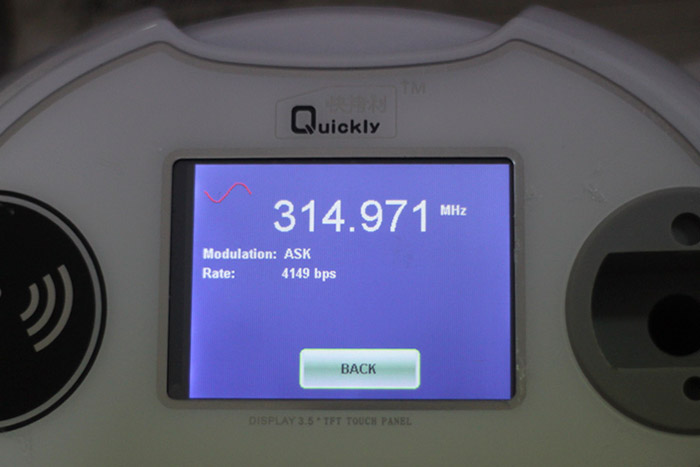
Put the key of the remote controller into the frequency detection area in a flat manner, and click "frequency detection" in the menu; then, press any key of the remote controller, and corresponding frequency, ID, modulation mode, speed and other parameters are then show on the screen.

Quickly Auto Key Programmer-6

9/05/2015

Top 3 Reasons to Get New PIWIS Cable for Porsche


Top 3 Reasons to Get New Porsche PIWIS Cable 

1.Software Version:V3.0.1
2.Coverage Vehicles: Most of Porsche Models from year 1990 to 2007
3. works very well for airbag fault, such as Boxster 986

Operation System : Windows XP
Our PIWIS cable communicates with your car just like the factory tool does, and can access all of the systems in the car. OBD2 was created for emissions related problems and only covers a limited subset of your car engine.
New PIWIS Cable for Porsche Supported Vechiles:

1990-1992 Porsche 944S2
1992-1995 Porsche 968
1990-1994 Porsche 911 (964)
1994-1998 Porsche 911 (993)
1996-1998 Porsche 911 Turbo (993)
1998-2004 Porsche 911 Carrera (996)
1998-2004 Porsche 911 Carrera 4 (996)
2000-2005 Porsche 911 Turbo (996)
2000-2005 Porsche 911 GT2, GT3 (996)
2005-2007 Porsche 911 (997)
1997-2004 Porsche Boxster (986)
2000-2004 Porsche Boxster S (986)
2005-2007 Porsche Boxster (987)
2003-2006 Porsche Cayenne (955)
2005-2007 Porsche Cayman (987)
PIWIS Cable Functions:

Reset service reminders
Reads diagnostic trouble codes
Displays actual values
Shows ECU information
Clears diagnostic trouble codes
Turns off check engine light
Turns off airbag light
PIWIS Cable Work on Following Systems:

DME
Airbag
ABS
Tiptronic
Alarm
Seat Memory
Heating & A/C
And more...

Top Reasons to Get I-2014 J2534


Top  Reasons to Get I-2014 J2534:

1. Latest Version: V2014.01
2. Support Multi-languages: English, Spanish, German, French, Italian, Portuguese, Bulgarian, Croatian, Czech, Danish, Dutch, Finnish, Hebrew, Hungarian, Polish, Romanian, Russian, Serbian, Slovenian, Swedish, Turkish
3. Support 23 Brands Updated, 5300 New Systems
4. Operating System: Windows XP; Windows 7 32bit
 

Installation Multi-diag 1-2014:
 
1). Open folder (1) Key on the CD and run the file KeyUpdate. Then confirm and wait for the message "successfully installed XXXXXX" and click "OK"
2). Start the installation folder (2) 1-2014 During your installation, if the software request an unlock key 31-xxxxxxxxxx, please contact us with the key to obtain an activation code. 
3). Select the language, then it will continue to install,  please wait until the software complete installation, usually it will take about 30 minutes to 2 hours, how much time to wait it depends on your computer configuration. When the message display saying "Multi-Diag is currently installed with profile ACTIA. Before you can use the program, you must restart your computer." Click "No, I will restart my computer later" and click "Finish" 
4). Go to the following folder C: \ ACTIA \ portal and then delete the file "WEGT.EXE", and clean "Recycle Bin" 
5). After delete this file, open folder (1) Key on the CD and run the file KeyUpdate. Then confirm and wait for the message saying "successfully installed XXXXXX" and click "OK" 
6). Then install "xs-ime-pt-207p-workshop.exe".  At the step, please connect the device to the car, then use the USB cable to connect with the computer, then it will prompt to install Pass Thru driver.
7). Go to My Computer - Properties - Hardware - Device Manager, when you find PC- 201411261510 - I+ME ACTIA XS Device and PassThru+ XS USB Driver, it means Multi Diag Access has successfully establish communication with the computer.
Then you can restart the pc.
 
Multi-Diag J2534 Functions:
 
After selecting the car manufacturer, then you can make the diagnosis for the different menus on offer (depending on cars models):
 
1. Maintenance
 
Diagnosis codes from all computers
Reset maintenance interval
Modification of the sewage
Read / erase fault calculators
Maintenance of the particulate filter
 
2. Air Conditioning
 
Diagnosis of cooling electronic
Reading settings cooling circuit,
Test servo actuators
 
3. Pollution control
 
Diagnosis of the particulate filter
Electronic control of pollutant emissions
Control of the Lambda probe
 
4. Liaison to the ground
 
Electronic configuration of the size of tires,
Electronic configuration of tires (winter / summer),
Setting valves tire pressure
Diagnosis and management of shock-driven
Calibration of the sensor angle Driving (initialization of the steering angle)
 
5. Body
 
Implementation of safety airbags (lock / unlock)
Reconfiguration of a new calculator Airbag,
Diagnosis of calculators Airbag,
Rain sensor windshield (reading and erasing fault)
Test panel and activators of lights,
Setting Xenon headlights,
Rear radar
 
6. Post-Equipment
 
Setting up the radio,
Configuration loader CD,
Setting alarms
Configuration of the coupler,
Configuration bicycle loading system
 
7. Braking
 
Diagnosis of calculators ABS, ESP.
Diagnosis and unlock electric brakes.
Flush the brake system.
 
8. Motor
 
Diagnosis of any calculator injection engine (diesel, gasoline, flexfuel, etc. ..)
Programming of injectors
Electronic configuration of the EGR valve
 
9. Expert Mode
 
Diagnosis of advanced computers,
Configuration of comfort functions,
Change the language of the instrument panel,
physical measures (option with a probe - not supplied)
Direct access to all functions of diagnosis.
 
V2014.1 Multi Diag Access J2534 System Requirements:
 
*CPU: Pentium/Athlon 1.8 GHz or higher
*RAM: 256 MB of system memory
*Hard Drive: 10 GB of available space
*VCI (vehicle communication Interface)
*DVD-ROM
*No Internet, WIFI
*No Antivirus software

8/05/2015

Tacho Pro 2008 July Universal Dash Programmer features and packing list

测速临2008编程系统的突出特点是:
1.Broken速度表可以修复舒适
2.Tacho临普遍的是通过清晰的菜单指导,容易自我explanitory操作
3.Backlit显示使得在阴天条件下工作可能
4.所有数据集可以进行编辑,保存和加载
5,存储的数据可传输到PC进行归档
测速临2008年包装清单:

1线为P607通用测速确定0676
2电缆11DU的测速通用0677 OK
3加密狗硬件对于测速通用0709 OK
4电缆宝马OBD2 + MB服务为重设测速通用0742 OK
5电缆ALFA156的测速通用0678 OK
6电缆ALFA145_146的测速通用0679 OK
7电缆P206 JAEGER的测速通用0684 OK
8电缆ALFA166的测速通用0681 OK
9电缆为P908通用测速0682 OK
10电缆ACCORD的测速通用0683 OK
11电缆P406 JAEGER的测速通用0680 OK
12 MB-电缆乙酰唑胺用于测速通用0685 OK
13电缆GTV SPIDER的测速通用0686 OK
14电缆MB SPRINTER KIENZLE的测速通用0687 OK
15电缆的MB-OBD2的测速通用0688 OK
16电缆MB-CAN的测速通用0689 OK
17电缆CRYSLER OBD2的测速通用0743 OK
18电缆多CAN总线的测速通用0690 OK
19电缆P-106测速通用0691 OK
20电缆SCOPRIO的测速通用0692 OK
21电缆VW GOLF3 + MB C-CLASS老了测速通用0744 OK
22电缆SPRINT威迪欧的测速通用0693 OK
23电缆大众CAN总线的测速通用0694 OK
24宝马电缆4,5,6 HW为测速通用0695 OK
25电缆夏朗2000年测速通用0696 OK
26电缆奥迪2000年测速通用0697 OK
27电缆OBD2 VW-欧宝的通用测速确定0698
电缆28 POLO98 / BELLTLE / B5的测速通用0699 OK
29宝马电缆的DIAG通用测速确定0700
30电缆宝马E36的测速通用0701 OK
31电缆BMW Z3 /紧凑的测速通用0702确定
32电缆奥迪+大众+ 2 OBD2测速通用0783 OK
33 DONGLE CRYSLER OBD2的测速通用0703 OK
34加密狗912测速通用0704 OK
35电缆912测速通用0712 OK
37 NEC软件狗测速通用(9S12 DONGLE)0732确定
38适配器93cx6的测速通用0705 OK
39适配器24COX的测速通用0706 OK
40适配器35 / 95XXX的测速通用0707 OK
42 CLIP EEPROM DIP-8CON的测速通用0715 OK
44 CLIP EEPROM SOIC-8CON的测速环球(5250)0713 OK
的测速通用0711 OK 45电缆电源
47测速通用手持设备0684 OK
81宝马CAS电缆确定
82 GE切诺基4199 OK
83串行通信电缆OK
84用户手册PDF DVD确定